You don’t have a signage department. You have a TV by the front desk, a few spare minutes, and a sense that it could be doing more than looping the same three slides all day. Getting the TV on is the easy part. The harder part is knowing what belongs on it at 8 a.m. and what belongs on it at 5 p.m.
Because the people looking at your TV at 8 a.m. are not the people looking at it at 5 p.m. Early on, they want to know what’s open, what’s on, and whether anything changed. At midday they have time to read about something you offer. Near closing they want to know what happens tomorrow.
A slideshow that plays the same way all day treats those three groups as one. It also leaves stale messages up. Harvard’s privacy and security office lists this as a risk: “If not managed carefully, signage may display wrong, outdated, or misleading information, causing confusion.” A sign that says “Summer Sale” in December is a familiar version of that.
Scheduling fixes both problems. You decide which messages run in which part of the day, and when each one stops. Then the sign keeps itself current while you do your other jobs.
Not long, and that sets the limit for everything else in this guide. Texas A&M University’s communications office says “Viewers typically spend only 10–15 seconds reading digital content, so keep your messages concise and impactful.” Its guidance also says “Total word count should not exceed 30 to 40 words per asset.”
Other schools land in the same place. The University of North Dakota says “Digital signs are meant to be viewed quickly (6 to 10 seconds), often from a distance.” IT@Cornell tells its sign owners to “Communicate only 1-2 key points of information.”
These are campus rules, so treat them as a starting point for your own lobby. Stand where your customers stand and see how much you can read before you’ve walked past.
So each slide gets one job. If a slide has to explain two things, make it two slides and put them in different parts of the day.
Start with the facts people need to get through the day. Think about what a person asks the first time they walk in, and put the answer on the TV before they ask.
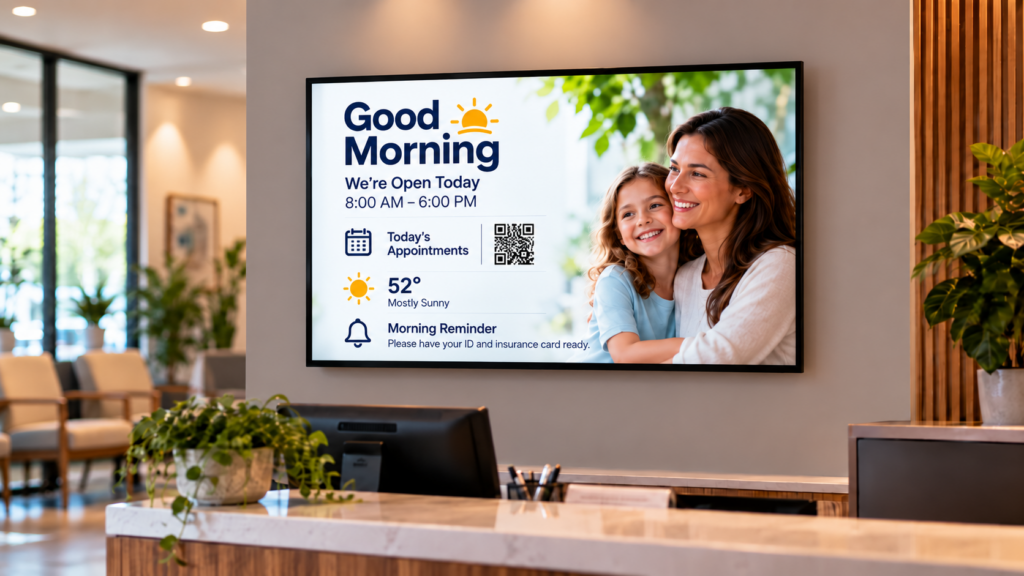
Good morning content is short and practical:
For example, “Open until 6 today. Back to 8 tomorrow.” That one line saves someone a question at the counter.
Weather and schedules are good candidates for live feeds, which pull in current information so you don’t retype it. News, weather, calendars and live web pages are the usual sources. You set a feed up once and it stays current on its own.
Midday is when people have a minute, so this is the time to tell them something about your business. It’s the best slot for your own services, an upcoming event, or a new offering. Keep it to one point per slide.
In a dental or vet waiting room, midday is when a patient has ten minutes and nothing to read. One slide can introduce the new hygienist, and the next can remind people they can ask the front desk about a service. The guide to waiting room digital signage without the privacy risk covers what to keep off a public TV. A gym might show the afternoon class lineup, and a salon might show a seasonal service.
If you run a place with several tenants, a directory tells visitors where to go. Marie, the managing partner at Phenix Salon Suites in Orange, California, said: “we have the digital signage in our lobby and we use it mostly for our directory.”
Changing a message fast matters just as much when plans shift. Rachel Madsen, marketing manager at Pybus Public Market in Wenatchee, Washington, said: “So if an event changes, if something’s canceled, we can immediately change it and get that information on screens on the concourse.”
Show what happens next. People leaving want tomorrow’s hours, a reminder about something they need to bring back, or a heads-up about a coming holiday closure. A simple thank-you slide works here too, as long as it’s the only one.
Closing content has a second job, which is getting tomorrow morning ready. Before you leave, make sure the morning slides are queued to take over and the day’s expired notices are gone.
And if you run a library, school or club with events and closures, the guide to library digital signage for events, hours and closures shows how the same idea works in a public building.
Here’s one way to lay it out for a small business. Change the content to fit yours, because the structure is what matters.
| Part of the day | What people want | Content to schedule | Keep it |
|---|---|---|---|
| Morning | What’s open, what’s on | Today’s hours, schedule, weather, changes | One fact per slide |
| Midday | Something to read while they wait | A service, an event, a new item, a directory | One point per slide |
| Closing | What happens next | Tomorrow’s hours, holiday notices, thank-you | Short and calm |
Every row asks for one fact or one point. That is what makes a sign readable from across the room.
Give every time-limited message an end date when you create it. That single habit keeps a sign trustworthy. If a promotion, closure notice or event slide has no end date, someone has to remember to take it down, and that someone is you.
Say it’s the Friday night before a holiday weekend. You add the closure slide from your phone, set it to start now and stop Tuesday at opening, and you’re done. Nobody walks over and peels anything off.
Compare that with a big campus. At the University of North Dakota, once an approved file is submitted, the university asks people to “allow 1-2 business days for your content to be added to the campus digital sign feed.” A large campus needs that review step. A small business that updates its own TV in a few minutes doesn’t, and that speed is one of the real advantages of running your own sign.
Start with three groups of slides and nothing fancier. One group for the opening hours, one for midday, one for closing. Put two or three slides in each, set the times, and watch it for a week.
Then adjust. Walk past at the times you scheduled. Ask a regular customer what they noticed. If nobody reads a slide, change it or cut it.
Here’s a short routine that works for one person:
If you’re still working out what sits behind the TV, the guide to digital signage players for small teams goes through what to look at first.
Most people put too much on a slide. If someone has to stop walking to read it, it’s too long, so cut it to the one thing they’d want to know and move the rest to a second slide or your website.
Old messages hurt more than you’d expect. A closure notice for last Tuesday tells customers nobody looks at your TV, which is why end dates matter and why a monthly review is worth ten minutes.
You’ll also be tempted to leave it alone once it works. People tune out a sign that never changes, so swap a midday slide every few days or let a live feed do the changing for you.
Check the real TV before you walk away. A slide that looks fine on your laptop can be hard to read from across the room.
And don’t try to say everything. If a message is for a small group, such as staff or one department, send it another way. The University of North Dakota’s guidance says digital signage is “not effective for” content intended for a limited or highly specific audience, and that applies to your lobby too.
Take a sheet of paper and draw three columns labeled morning, midday and closing. Under each one, write the single question your customers most often ask at that time. Those three questions are your first three slides.
Start with one message per slide and a clear picture or short line of text. Build it in your signage software’s page editor or import a design from a tool you already use. Preview it, then check it on the actual TV before you publish.
You need a TV with an HDMI port, a media player, a Wi-Fi connection, and signage software to manage content. Most small teams already own the TV. The player is the small box that sits between the TV and your content.
Change time-sensitive messages the moment they’re no longer true. For everything else, refreshing a slide or two every few days keeps regulars from tuning out. Live feeds, like weather or a calendar, update themselves between your changes.
SmartSign2Go sells cloud signage plans starting at $19 per screen per month, with no contracts. Scheduling by time, day or month comes with the Advantage plan, which also adds video and audio. You can see the players and plans on the shop page.
If you want different content at different times of day, the Advantage plan is the one that includes scheduling by time, day or month. The player ships already set up, and you plug it into any HDMI TV. Plans start at $19 per screen per month, and you can compare them on the pricing page and see the players in the shop. If you’d like to see scheduling working first, book a demo or call (844) 888-7446.